

Enterprise Layer 3 Managed PoE Switch
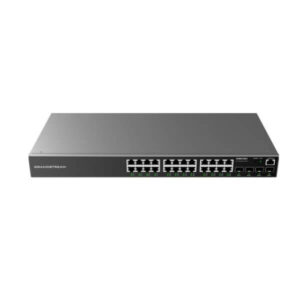
Grandstream GWN7816P 48-Port Layer 3 Managed PoE Switch
Build a high-density wired network without separating switching, routing, high-power PoE and 10Gb uplinks into multiple access-layer devices. The Grandstream GWN7816P combines 48 Gigabit PoE ports, six 10Gb SFP+ uplinks, a PoE budget of up to 740W, advanced Layer 3 functions and centralized management options in an enterprise-focused platform designed for medium-to-large business networks.
6 × 10Gb SFP+
Up to 740W PoE budget
Layer 3 routing
A practical fit for dense enterprise access networks
The GWN7816P is designed for networks where endpoint count, PoE demand and uplink capacity all matter at the same time. A conventional 48-port switch can provide the physical connections a business needs, but it may still force the network team to add separate power injectors, compromise uplink bandwidth or depend on another device for routing between network segments. Grandstream approaches the problem differently with the GWN7816P: the switch provides a full bank of 48 Gigabit Ethernet access ports, PoE on those access ports, six 10Gb SFP+ interfaces and Layer 3 functionality in one managed chassis.
That makes the switch relevant for office buildings, hotels, schools, healthcare environments, warehouses, multi-floor workplaces, branch hubs and other sites where many powered network devices converge in a communications room. Typical endpoints include Wi-Fi access points, IP phones, SIP intercoms, access-control devices and IP surveillance cameras. Instead of treating those devices as separate power and data projects, the GWN7816P lets the network team plan them as part of one structured switching design.
The model is especially useful when a site is moving from a smaller access switch to a higher-density architecture and wants room for future growth. The 48-port format can consolidate multiple low-port-count switches, while the 10Gb SFP+ interfaces create faster paths toward aggregation equipment, servers or other network infrastructure. Layer 3 services then give administrators greater control over how VLANs and routed segments interact, reducing dependence on a separate router for every internal traffic flow where the design permits switching and routing to be handled locally.
Core hardware and performance
PoE capacity for access points, phones and security devices
PoE capacity is one of the main reasons to choose the GWN7816P instead of the non-PoE GWN7816. The switch supports IEEE 802.3af, 802.3at and 802.3bt power standards, allowing it to serve a mixed endpoint environment rather than forcing every connected device into the same power class. This is important in modern business networks because an IP phone may have modest power requirements, a Wi-Fi access point may need more, and a high-performance access point or other supported endpoint may require higher-power PoE.
Ports 1 through 8 are the highest-power positions, supporting up to 60W per port through PoE++. Ports 9 through 48 support up to 30W per port. With the supplied 920W power supply, the switch provides a maximum total PoE output of 740W. That headline figure is substantial, but good network planning still requires a power budget rather than simply counting ports. Forty-eight connected devices do not necessarily consume the same amount of power, and the actual demand depends on the endpoint model, operating mode and negotiated PoE class.
For deployment planning, reserve the PoE++ ports for devices that genuinely need the additional power envelope. Examples can include higher-performance wireless access points or other IEEE 802.3bt-compatible endpoints. Lower-power phones, cameras and conventional access devices can then occupy the remaining PoE+ ports. This allocation method protects the high-power positions for devices that need them and makes it easier to understand total consumption as the site expands.
The large power budget also simplifies cable and power design. When endpoints can receive both data and power over the structured Ethernet run, installers can reduce the number of local power adapters required at desks, ceilings, walls or camera locations. Centralized PoE also makes network power easier to document and troubleshoot. For resilience planning, however, buyers should evaluate upstream power protection and backup requirements for the switch itself because a high-density PoE switch can become a common power source for many business-critical endpoints.
Six 10Gb SFP+ ports for uplink flexibility
A 48-port access switch can collect a large amount of traffic. If that traffic exits through a single low-speed uplink, the uplink can become the point where users experience congestion even though their individual access ports are operating normally. The GWN7816P addresses this by providing six 10Gb SFP+ interfaces in addition to the 48 Gigabit copper ports. These interfaces can be used for uplinks, switch-to-switch connections, server connectivity or other supported high-speed links based on the network design.
Six SFP+ ports provide more design flexibility than a simple pair of uplinks. A network team can reserve links for upstream redundancy, connect to different distribution switches, create aggregated links where appropriate, or dedicate high-speed connectivity to selected infrastructure. The exact topology should be designed around bandwidth, redundancy and failure domains rather than connecting every SFP+ port simply because it is available.
Grandstream specifies support for compatible 10Gb optical modules and DAC use within the documented limits. Module selection should match the fiber type, distance, connector format and supported transceiver requirements of both ends of the link. For copper 10Gb transceiver modules, buyers should also verify Grandstream’s module-count and placement guidance before installation. The SFP+ interfaces are therefore best treated as flexible enterprise uplinks rather than generic ports where any transceiver can be assumed to work.
For businesses upgrading from 1Gb uplinks, the 10Gb interfaces can help extend the useful life of the access layer. They let the network carry traffic from many Gigabit endpoints toward faster aggregation without replacing the entire switch merely to obtain higher uplink speed. This can be valuable in Wi-Fi-heavy environments, video surveillance networks, converged voice and data systems, and sites where centralized applications generate sustained east-west or north-south traffic.
Layer 3 switching for segmented business networks
The GWN7816P is not limited to basic Layer 2 connectivity. It supports Layer 3 features that help administrators build routed network segments directly within the switching environment. This is useful when a business wants separate VLANs for users, voice, surveillance, wireless infrastructure, guest access, building systems or management traffic while still allowing carefully controlled communication between selected segments.
Supported routing capabilities include static routing and dynamic routing functions such as RIP, RIPng, OSPF and OSPFv3, with BGP also listed for the GWN7816(P) in Grandstream’s current model documentation. The correct protocol depends on the network scale and design. Smaller business deployments may only need static routes and VLAN interfaces. Larger networks may benefit from dynamic routing so that route information can adapt to topology changes without requiring every path to be maintained manually.
The switch also supports IPv4 and IPv6 environments, making it suitable for organizations that already operate dual-stack networks or are preparing for a staged IPv6 transition. Buyers should still validate their required routing functions against the firmware version planned for deployment, especially when a design depends on a specific advanced feature or a function that has historically appeared as pending in earlier documentation.
Layer 3 capability can simplify internal architecture, but it does not eliminate the need for a firewall or edge security gateway. Inter-VLAN routing inside a managed switch and internet-edge security solve different problems. Use the GWN7816P for efficient internal segmentation and routing where appropriate, while retaining dedicated perimeter controls for WAN security, VPN, advanced threat handling or policy functions that belong at the security edge.
VLANs, link aggregation and resilient switching features
Enterprise networks rarely operate as one flat broadcast domain. The GWN7816P supports VLAN functionality so administrators can separate traffic according to business purpose, security requirements or operational ownership. Grandstream documents support for thousands of VLANs, IEEE 802.1Q tagging, port-based VLANs and additional VLAN mechanisms on the GWN7816(P). This gives network teams the building blocks for separating departments, voice devices, guest traffic, cameras and management systems without installing a different physical switch for every logical network.
Voice VLAN capabilities are particularly useful in converged office networks where IP phones and computers may share the same access area but should receive different network treatment. Combined with QoS, this can help keep real-time communications isolated and prioritized. The design still needs consistent VLAN IDs, tagging rules and uplink configuration across the broader infrastructure. A VLAN configured on one switch does not create a complete path unless adjacent switches, routers and gateways are configured to carry and route it correctly.
Link aggregation can combine supported physical links into a logical connection for greater bandwidth and resilience. Spanning-tree options help prevent loops and provide controlled path redundancy. Grandstream lists STP, RSTP/MSTP and related enterprise variants for the GWN7816(P), along with multiple spanning-tree instances. These capabilities are relevant when the switch participates in a redundant topology with multiple uplinks or interconnected access switches.
The best configuration depends on topology rather than feature count. For example, adding redundant links without correctly configuring aggregation or spanning tree can create loops instead of resilience. Organizations with multiple switches should therefore plan the logical topology, root-bridge strategy, uplink roles and failure behavior before connecting redundant paths. The GWN7816P provides the tools for such designs, but disciplined configuration remains essential.
QoS for voice, video and latency-sensitive traffic
When many services share the same switching infrastructure, not all traffic has the same sensitivity to delay and packet variation. File transfers can usually tolerate short delays, while voice and interactive video are much more noticeable when packets arrive late or irregularly. The GWN7816P includes QoS functions intended to help administrators classify, prioritize and shape network traffic so critical services can receive more predictable treatment during periods of contention.
Grandstream lists port priority, priority mapping, multiple queue scheduling methods, traffic shaping and rate limiting among the model’s QoS capabilities. These controls can be applied as part of an end-to-end policy for SIP voice, video, business applications or other latency-sensitive flows. The important phrase is end-to-end: prioritization on a single access switch cannot guarantee service quality if upstream switches, routers or WAN connections ignore the markings or become congested elsewhere.
In a practical office deployment, administrators might combine a voice VLAN with QoS markings and dedicated policies for IP telephony while applying rate limits to guest or non-critical traffic. In a surveillance environment, policies might protect management and business traffic from large video flows. The specific settings should follow the application requirements, traffic profile and broader network design rather than relying on a universal preset.
Security controls at the access layer
An enterprise access switch sits close to users and endpoints, so it is a logical place to enforce controls that reduce common Layer 2 and access-layer risks. The GWN7816P includes a broad group of security capabilities, including 802.1X authentication, RADIUS and TACACS+ integration, port security, sticky MAC behavior, IP source guard, ARP inspection, DHCP snooping, storm control and protections against selected denial-of-service conditions.
802.1X can help organizations require identity-based authentication before granting network access. RADIUS and TACACS+ support can integrate the switch into centralized authentication and administration workflows. DHCP snooping and ARP inspection are useful for reducing risks associated with rogue DHCP activity or manipulated address-resolution behavior when configured correctly. Port isolation can further limit direct communication between selected endpoints where business requirements call for separation.
Access-layer controls are most effective when they are part of a defined security architecture. Enabling every available feature without understanding dependencies can disrupt legitimate traffic. DHCP snooping, for example, requires correct trust settings. 802.1X requires an authentication design, compatible endpoints and a fallback approach for devices that cannot authenticate in the same way as user computers. Administrators should stage changes, document exceptions and test policies before broad rollout.
The switch also supports secure administrative access methods such as HTTPS and SSH. Telnet may be available for compatibility, but organizations should prefer encrypted management protocols where possible. Management interfaces should be placed on controlled networks, protected with strong credentials and integrated with the organization’s access policies. A secure switch configuration is not just a list of security features; it is the combination of protected management, authenticated access, segmentation and carefully designed traffic controls.
Management options: local, cloud and on-premises
Different organizations prefer different management models, and the GWN7816P supports several. Administrators can manage the switch through its local Web interface or CLI for direct device-level control. Grandstream also supports centralized management through GDMS Networking as its cloud-based networking management platform and GWN Manager as an on-premises management option. Supported GWN router workflows can also participate in management depending on the deployment.
Local management is useful for standalone installations, commissioning work and environments where administrators want direct access to a specific switch. Centralized management becomes more valuable as the number of devices or sites increases. A unified management platform can simplify inventory, configuration consistency, monitoring and troubleshooting across multiple switches and other supported Grandstream networking devices.
Cloud management is attractive when administrators oversee distributed branches or do not want to host the management platform locally. On-premises management can be preferable where network-management data and control need to remain inside the organization’s own environment. The GWN7816P gives buyers a choice rather than locking the switch into one operational model.
Before deployment, define who will manage the switch, where management traffic will live, how credentials will be controlled, and how firmware changes will be staged. Centralized management improves operational efficiency, but it should still follow change-control and security practices. Where a specific advanced function depends on firmware, use a validated firmware baseline across comparable switches instead of allowing devices to drift between inconsistent versions.
Multicast handling for video and service discovery
Multicast traffic can create unnecessary load if it is flooded across ports that do not need to receive it. The GWN7816P supports IGMP Snooping for IPv4 multicast and MLD Snooping for IPv6 multicast, helping the switch learn where multicast receivers are located and forward streams more selectively. This is relevant for environments carrying IPTV, multicast video, certain discovery mechanisms or other multicast-dependent applications.
The switch also supports MVR and related multicast functions documented for the platform. These capabilities can be valuable in hospitality, education or enterprise media environments where the same multicast services need to reach selected user groups without turning the access network into a flood domain. As with routing and security, multicast features should be configured as part of the broader topology, including querier placement and VLAN design where required.
For buyers, the important point is that the GWN7816P is intended for more than simple port expansion. Its multicast control features are part of an enterprise switching feature set designed for structured traffic management. If the planned network includes high-volume video or multicast services, document those requirements early so the switch configuration and uplink capacity can be designed around them.
DHCP, monitoring and troubleshooting functions
The GWN7816P provides DHCP-related functions including DHCP server and relay capabilities, along with options used in managed enterprise networks. This gives administrators flexibility when IP addressing is centralized in another part of the network or when a local service is appropriate for a specific topology. The switch also supports features such as DHCP Option 82 and other documented options that can assist provisioning or policy workflows in compatible environments.
Operational visibility is equally important. Grandstream includes CPU and memory monitoring, power-supply and fan alarms, SNMP, RMON, syslog, LLDP and LLDP-MED, backup and restore, ping, traceroute, port mirroring and copper diagnostics among the available maintenance capabilities. These tools give administrators multiple ways to understand what the switch is doing and where a fault may be occurring.
LLDP and LLDP-MED are useful in environments with managed endpoints such as IP phones because they help devices exchange network information with the switch. Port mirroring can support packet analysis by copying traffic to a monitoring interface. SNMP and syslog integration can feed a broader monitoring platform so problems are visible without logging into the switch manually.
A well-managed deployment should establish monitoring at installation time rather than waiting for an outage. Configure naming, location details, logging, time synchronization, alerting and management access while the network is being commissioned. High-density switches support many endpoints, so a single device fault can affect a large part of a site. Proactive monitoring reduces the time required to isolate power, link, temperature, fan or configuration issues when they occur.
Buying consideration: calculate PoE and uplink demand before ordering
The GWN7816P has a large 740W PoE budget, but it should still be matched to the actual endpoint list. Create a simple schedule showing each device type, quantity and expected maximum PoE requirement. Reserve the eight 60W ports for devices that require IEEE 802.3bt power and confirm that the aggregate requirement remains within the available power budget. This is particularly important when a switch will power many high-performance access points or other high-draw endpoints.
Do the same for uplink traffic. Forty-eight Gigabit access ports can theoretically generate far more traffic than a single Gigabit uplink can carry. The six 10Gb SFP+ ports give the switch strong uplink options, but the right number and topology depend on real traffic patterns and redundancy goals. Plan optical modules or DAC connections, aggregation strategy and upstream switch capacity together with the GWN7816P rather than treating uplinks as an afterthought.
Where the GWN7816P fits best
Wi-Fi access networks
Use PoE to power large numbers of wireless access points while reserving the 60W ports for higher-power APs. Multiple 10Gb uplinks help prevent the wired backhaul from becoming the bottleneck as wireless capacity grows.
IP telephony
Power desk phones centrally, separate voice traffic with VLANs and apply QoS policies to latency-sensitive communications. LLDP-MED and enterprise authentication options support structured voice deployments.
Video surveillance
Connect and power many IP cameras from one rack switch, then use VLANs, multicast controls, uplink capacity and security policies to isolate surveillance traffic from ordinary user networks.
Hotels and campuses
Support access points, phones, cameras and building systems on a segmented infrastructure. Centralized management can simplify operations across multiple switches or locations.
Large office floors
A 48-port density suits communications rooms serving many desks, collaboration spaces and network devices, while Layer 3 routing can reduce unnecessary traffic between internal segments.
Branch aggregation
Use the switch where local access, PoE and routed segmentation need to converge in one device, with 10Gb SFP+ links connecting toward higher-layer switching or server infrastructure.
Deployment planning checklist
- Count endpoints by type. Separate ordinary data devices from PoE phones, cameras, access points and high-power PoE++ equipment.
- Build a PoE budget. Add the maximum expected draw for powered endpoints and keep appropriate headroom within the switch’s total PoE capacity.
- Allocate ports 1–8 deliberately. Reserve the 60W-capable positions for devices that need the extra power rather than consuming them randomly.
- Design VLANs before cabling is complete. Decide how user, voice, guest, camera, management and infrastructure traffic will be separated.
- Choose uplink media. Match SFP+ optics or DAC connections to distance, fiber type, compatibility and upstream interfaces.
- Plan redundancy. Define link aggregation, spanning-tree behavior and upstream paths before connecting redundant links.
- Choose the management model. Decide whether the switch will be managed locally, through GDMS Networking, through GWN Manager or within a broader supported Grandstream deployment.
- Set a firmware baseline. Validate required functions against a supported firmware release before enabling advanced features across production switches.
- Secure administration. Use controlled management networks, strong credentials and encrypted administrative access methods.
- Monitor from day one. Configure logging, alerts, SNMP or centralized monitoring so power, fan, link and system issues are visible quickly.
GWN7816P versus GWN7816: which one should you choose?
The GWN7816 and GWN7816P share the same general 48-port Layer 3 switching platform and six 10Gb SFP+ uplinks, but the key difference is power delivery. The GWN7816 is the non-PoE model. The GWN7816P adds PoE across the 48 access ports, including PoE++ capability on the first eight ports and a total PoE budget of up to 740W with the standard power supply.
Choose the GWN7816P when the switch will directly power phones, cameras, access points or other PoE endpoints. This reduces the need for separate injectors and creates a more centralized power design. Choose the non-PoE GWN7816 when connected devices have their own power and the PoE subsystem would add cost, power draw and chassis requirements without delivering practical value.
The decision should be based on the endpoint plan rather than a preference for the higher specification. If a site expects PoE growth during the lifetime of the network, selecting the GWN7816P at the outset may avoid replacing the access switch later. If the environment is dedicated to non-PoE servers, workstations or other independently powered equipment, the GWN7816 may be sufficient.
Power-supply and rack considerations
The GWN7816P is an enterprise rack-oriented switch with active cooling and a high-capacity power subsystem. Grandstream lists four fans and a standard 920W power supply for the PoE model, with support for an additional hot-swappable power supply purchased separately. This hardware profile is appropriate for a communications room or equipment rack rather than a quiet desk environment.
Because the switch may deliver hundreds of watts to connected endpoints, power planning should include the switch and the downstream PoE load. Ensure that the rack circuit, UPS and power distribution are sized for the intended deployment. A UPS selected only from the switch’s idle consumption can be undersized when the PoE load grows. Consider required runtime, PoE load, other rack equipment and future expansion when calculating backup-power capacity.
The chassis dimensions are approximately 440mm wide, 380mm deep and 44mm high, with a listed unit weight of about 6kg. Verify rack depth, cable-management space, ventilation and rear clearance. High-density copper cabling can place physical strain on a rack if cable support is not planned correctly, so patch-panel layout and horizontal or vertical cable management should be considered at the same time as the switch.
Grandstream specifies an operating temperature range of 0°C to 45°C with non-condensing humidity limits. Equipment rooms should remain within the documented environmental range. Good airflow matters because a fully populated PoE switch and its power system can generate significant heat. Avoid blocked vents and leave appropriate rack airflow paths around the device.
What the performance figures mean in practice
Grandstream specifies a switching capability of 216Gbps, total non-blocking throughput of 108Gbps and a forwarding rate of 160.704Mpps for the GWN7816(P). These figures describe the switch’s internal traffic-handling capacity under defined conditions and help position it for enterprise access and distribution tasks. They should not be interpreted as a promise that every application will achieve the headline rate simultaneously.
Real application performance depends on packet size, topology, protocol overhead, uplink capacity, routing and security configuration, endpoint behavior and the rest of the network. A user connected at 1Gb does not automatically receive 1Gb application throughput to every destination. Likewise, many active endpoints sharing an uplink will compete for that uplink’s capacity unless multiple links or higher-speed paths are designed appropriately.
For most buyers, the value of the GWN7816P is the combination of performance and architecture rather than one isolated benchmark. Forty-eight Gigabit access ports provide endpoint density, six 10Gb SFP+ links provide fast aggregation options, and Layer 3 functions let the switch make local forwarding and routing decisions. Together, these capabilities create a platform suited to high-density business networks where simple unmanaged switching would not provide enough control.
Frequently asked questions
How many PoE ports does the Grandstream GWN7816P have?
The GWN7816P provides PoE on all 48 Gigabit Ethernet access ports. Ports 1–8 can provide up to 60W per port using PoE++ where the connected device and power negotiation support it, while ports 9–48 provide up to 30W per port. The total PoE budget is up to 740W with one power supply.
Does the GWN7816P support 10 Gigabit uplinks?
Yes. It includes six 10Gb SFP+ interfaces. These can be used for supported high-speed uplinks, aggregation links and other compatible 10Gb connections. The chosen transceiver or DAC should be validated for compatibility, distance and media type.
Is the GWN7816P a Layer 3 switch?
Yes. It is an enterprise Layer 3 managed switch. It supports VLAN interfaces, static routing and documented dynamic-routing functions, making it suitable for networks that need routing between internal segments as well as traditional Layer 2 switching.
Can it power Wi-Fi access points?
Yes, provided the access point uses a supported IEEE PoE standard and remains within the port and total power budget. The first eight switch ports are particularly useful for higher-power access points because they support up to 60W PoE++.
Can it power IP phones and IP cameras?
Yes. IP phones and IP cameras are among the common endpoint types suited to the GWN7816P. Check each endpoint’s PoE requirement and calculate the total budget when many devices will be powered from the same switch.
How is the GWN7816P managed?
The switch supports local Web management and CLI access. Grandstream also supports centralized management through GDMS Networking for cloud-based management and GWN Manager for on-premises management, along with supported GWN router management workflows.
Does it support VLANs and QoS?
Yes. The platform includes advanced VLAN functionality and QoS tools including prioritization, queue scheduling, traffic shaping and rate limiting. These are useful for separating departments or services and protecting latency-sensitive traffic such as voice and interactive video.
What security features are available?
Grandstream documents 802.1X authentication, RADIUS, TACACS+, port security, DHCP snooping, ARP inspection, IP source guard, storm control, port isolation and protections against selected denial-of-service conditions, among other controls. The exact configuration should follow the organization’s security design.
Is a second power supply included?
Grandstream specifies support for an additional hot-swappable power supply purchased separately. Buyers who require power-supply redundancy should confirm the correct compatible PSU and deployment configuration when ordering.
Is the GWN7816P suitable for a small office?
It can work in a small office, but it is usually most appropriate where the business can use its 48-port density, large PoE budget, Layer 3 features or 10Gb uplinks. A smaller switch may be more economical and operationally simpler when only a handful of ports are required.
What is the difference between the GWN7816P and a basic PoE switch?
A basic PoE switch may provide connectivity and endpoint power but limited segmentation, routing or centralized control. The GWN7816P combines high-density PoE with six 10Gb SFP+ uplinks, Layer 3 routing, extensive VLAN and QoS controls, multicast management, security functions and enterprise management options.
Why choose the GWN7816P for an enterprise network refresh?
Network refresh projects are often triggered by several problems at once: too few ports, insufficient PoE, slow uplinks, unmanaged segmentation, inconsistent switch configuration or an expanding number of wireless and surveillance devices. The GWN7816P is useful because it addresses those requirements together rather than solving only one. Its 48 access ports increase density, its 740W PoE budget supports a large powered-device population, and its six SFP+ interfaces create room for faster upstream connectivity.
The Layer 3 feature set also gives network teams more architectural options. Instead of sending every internal VLAN-to-VLAN flow to an external router, selected routing can be handled closer to the access layer when that design is appropriate. VLANs, ACLs, QoS, multicast controls and authentication features then help shape how different device groups use the network.
Centralized management can further reduce operational friction, especially in multi-switch or multi-site environments. The ability to use cloud-based GDMS Networking or on-premises GWN Manager lets the organization select the management approach that best fits its operational and governance requirements. Local Web and CLI access remain available for direct administration and troubleshooting.
The GWN7816P should still be purchased as part of a planned architecture, not simply because it has a large specification list. Confirm the number and type of endpoints, power budget, rack and UPS capacity, uplink topology, transceiver requirements, management platform and security policy. When those requirements align, the GWN7816P can serve as a capable access or distribution switch for a demanding business network.
Plan your Grandstream GWN7816P deployment
The right switch selection depends on more than port count. Review your PoE endpoint list, uplink bandwidth, VLAN and routing design, redundancy requirements and preferred management model before finalizing the order. For a 48-port environment that needs high PoE capacity, multiple 10Gb uplinks and enterprise Layer 3 controls, the Grandstream GWN7816P is a strong candidate.
Need help selecting a compatible enterprise switching design? Contact Fourteck with your endpoint count, PoE requirements, number of uplinks and deployment type so the solution can be matched to your network requirements.
Reviews
There are no reviews yet.