
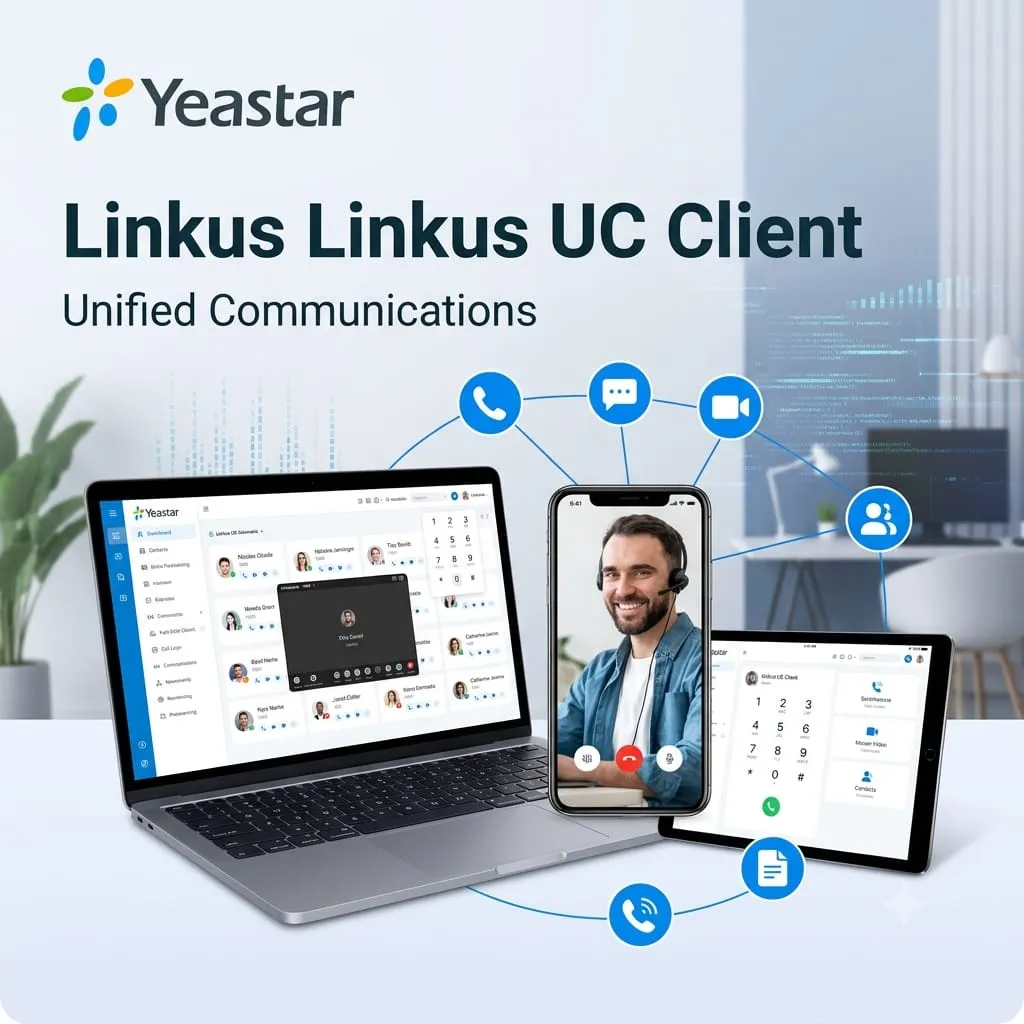
Yeastar Linkus UC Clients in Dubai, UAE
Bring office calling, messaging, meetings, contacts, and team collaboration into one business communication app. Linkus helps Yeastar PBX users stay reachable from desktop, mobile, and web environments, making it suitable for UAE companies with hybrid staff, distributed teams, customer service users, mobile sales teams, and branch offices that need controlled business communication rather than personal calling habits.
✓ User Extension Guidance
✓ UAE Quote Assistance
✓ Remote Work Planning
Quick Product Information
Best Suited For
Companies that use or plan to deploy Yeastar PBX and want employee communication across office, remote, and mobile environments.
Main Buyer Benefit
One business identity for calling and collaboration, reducing dependency on personal numbers and scattered apps.
Check Before Quote
Confirm PBX model, firmware, user count, extension plan, remote access needs, mobile users, and required client features.
FourTeck Help
FourTeck.com can help align PBX, licenses, phones, networking, and user deployment needs before quotation.
Product Overview
Yeastar Linkus UC Clients Dubai is designed for organizations that want employees to communicate through their business phone system from more than a physical desk phone. In many offices, users now divide their workday between desks, meeting rooms, client visits, home offices, warehouse floors, and mobile locations. A traditional extension is still important, but it may not be enough when staff need to answer calls, check call history, message colleagues, join meetings, transfer calls, or access contacts without being tied to one desk.
Linkus brings Yeastar communication features into a modern client experience. Depending on the connected Yeastar phone system, users can make and receive calls, manage calls, flip calls between devices, use instant messaging, check presence, join meetings, share files, manage contacts, access voicemails, and control desk-phone calling from a computer interface. For managers and IT teams, the value is not only convenience. It also helps keep communication inside a managed company system, improves customer response, supports hybrid work, and gives users a familiar way to handle daily calls.
For UAE buyers, the important decision is not only whether the app exists; it is whether the right PBX platform, user licenses, remote access method, network setup, and user permissions are aligned. FourTeck.com can help review those points before a quote is requested, especially for companies upgrading from older PBX systems, adding softphone users, opening branches, or standardizing communication across teams.
Key Business Benefits
◆ Better Extension Mobility
Users can stay connected through their office extension across supported desktop and mobile clients. This helps sales, service, management, and remote teams avoid missed business calls when they are away from their desk.
◆ Unified Team Communication
Calling, messaging, meetings, contacts, and presence are easier to manage when users work inside a connected communication environment rather than using separate personal tools for every task.
◆ Faster Customer Response
Reception, sales, service, and account teams can handle calls, transfers, missed calls, and voicemail more efficiently when key communication controls are available from the devices they already use.
◆ Remote Work Readiness
When configured correctly, softphone access supports work-from-anywhere communication while still keeping business identity, extension dialing, and central PBX features under company control.
◆ Easier User Adoption
A familiar app interface can reduce the learning curve for staff who need business phone features without remembering complicated feature codes or relying only on a desk phone keypad.
◆ Scalable Communication Planning
Companies can plan users, departments, branch extensions, mobile access, contact handling, and related Yeastar systems based on business growth rather than buying only by model name.
Product Highlights
Linkus is most valuable when a company wants a connected communication workflow across multiple user devices. Instead of treating mobile phones, desktops, desk phones, and web browsers as separate islands, the client helps employees access business communication tools from the environment that suits their workday. Key highlights include audio and video calling, call handling, call flip between supported devices, instant messaging, team chats, presence status, file sharing, contacts management, voicemail access, web-based meetings, call history, desk phone control, and integrations depending on the PBX platform and plan.
For decision-makers, the practical highlight is flexibility. A receptionist may use a desktop interface for faster transfers. A sales user may answer through a mobile app while visiting customers. A manager may use web meetings and presence to coordinate internal teams. A support agent may benefit from call logs, contacts, voicemail, and queue-related visibility when enabled by the correct system. The exact feature set must be checked against the Yeastar PBX system being used because Linkus Web Client, advanced collaboration functions, integrations, and call center capabilities can depend on the connected platform, user permissions, and subscribed plan.
FourTeck.com helps buyers avoid mismatch between expectation and deployment. Before procurement, the team can review whether a new Yeastar P-Series system, existing S-Series VoIP PBX, cloud deployment, IP phone estate, network setup, or remote access requirement is suitable for the requested user experience.
Technical Specifications
Configuration and Buyer Guidance
Before requesting a quote, buyers should look beyond the application name and confirm the complete communication environment. Start with the current or planned Yeastar PBX model. Check whether it is P-Series, S-Series, Cloud PBX, appliance, software, or hosted deployment. Then confirm how many users need mobile access, desktop access, web access, or a mix of devices. A receptionist, support agent, manager, remote sales user, and warehouse supervisor may all need different calling workflows.
How many extensions need Linkus access and which teams require mobile or desktop clients?
Do users need only calling, or also messaging, conferencing, presence, contacts, and integrations?
Will users connect from office LAN, home networks, public internet, VPN, or remote access service?
Which operating systems, smartphones, browsers, headsets, and IP phones will be used?
Share these details with FourTeck.com so the quote can cover the correct PBX option, user requirements, licenses, accessories, and deployment notes. This avoids under-sizing, missing features, or confusion between app availability and actual business use.
Ideal Business Use Cases
Hybrid Office Teams
Employees can stay reachable through business extensions from office desks, laptops, mobile phones, and browser access where supported.
Sales and Account Managers
Mobile users can maintain a professional business calling identity while working between customer meetings, offices, and remote locations.
Customer Service Teams
Call history, voicemail, contacts, and transfer controls help improve response handling when the PBX environment is planned correctly.
Branch and Multi-Site Users
Distributed staff can communicate through a common phone system without every location needing the same desk-phone setup.
Management and Admin Users
Managers can monitor availability, coordinate internal conversations, and respond faster when presence and contacts are enabled.
Growing SMB Communication
SMBs upgrading from basic calling can plan a more flexible UC environment with messaging, meetings, and device mobility.
Yeastar Linkus UC Clients Call Mobility
Call mobility is the feature area most buyers notice first. A user can move beyond a single desk phone and handle business communication through supported desktop, mobile, or web clients. For a company, this means fewer missed calls, more consistent customer response, and easier extension-based communication for people who are not always at one workstation. When call flip, transfer, hold, mute, voicemail, call history, and device switching are available, staff can keep a conversation moving without asking customers to call back on a personal number. FourTeck.com recommends checking the PBX platform, network design, headset requirements, user roles, and mobile policy before rollout so the experience matches the business workflow.
Yeastar Linkus UC Clients Collaboration Tools
Communication is no longer limited to a single phone call. Teams often need quick messages, internal updates, shared contacts, meeting links, file sharing, and visibility into whether a colleague is available. Linkus helps bring these activities closer to the business phone system, giving users a more complete daily communication workspace. For businesses, this can reduce app switching and improve team coordination. The available collaboration tools depend on the connected Yeastar environment, so buyers should confirm whether they need team chats, web meetings, screen sharing, shared phonebooks, CRM integrations, or call center-related tools before choosing the PBX plan and user configuration.
Yeastar Linkus UC Clients Deployment Planning
A successful softphone deployment depends on more than installing an app. IT teams should review internet reliability, firewall rules, remote access, SIP trunking, extension permissions, user onboarding, mobile device policies, password practices, and support ownership. The deployment may also require suitable headsets, IP phones, PoE switching, Wi-Fi coverage, VPN policy, or Yeastar Remote Access Service depending on the environment. FourTeck.com can help buyers prepare a practical checklist so the communication system works for real users from day one, not only in a test scenario.
What Buyers Should Check Before Purchase
Business buyers often ask for a softphone app before checking whether the underlying phone system can deliver the expected experience. The correct approach is to confirm the communication objective first. Do you need users to receive office calls on mobile phones? Do managers need web meetings? Do reception users need transfer controls? Do teams need messaging and presence? Do remote users require secure access without complicated network changes? These answers affect the PBX, plan, licensing, network, security, and accessory requirements.
Configuration Fit
Confirm PBX model, user count, extension permissions, client type, call handling needs, and collaboration features.
Compatibility Check
Check existing IP phones, SIP trunks, CRM tools, browsers, operating systems, firewalls, Wi-Fi, and headsets.
Availability and Warranty
Availability, subscription, support handling, and deployment scope may vary by PBX option, country, and supplier status.
Quote Preparation
Share user count, branch locations, remote access needs, current PBX details, required apps, and expected go-live timeline.
UAE Availability and Service Support
FourTeck.com supports Yeastar communication inquiries across Dubai and the UAE with assistance for product selection, PBX compatibility review, extension planning, quote requests, delivery coordination for related hardware, and warranty guidance where applicable. Availability may vary based on the selected Yeastar system, license requirement, supplier status, order quantity, and whether the project includes only Linkus user enablement or a broader PBX deployment. Buyers can contact FourTeck.com to review current options, suitable alternatives, and deployment considerations before placing a purchase request.
Dubai, Abu Dhabi, Sharjah, and Ajman Coverage
Businesses in Dubai, Abu Dhabi, Sharjah, Ajman, and other UAE locations can contact FourTeck.com for Yeastar PBX and Linkus client guidance. The team can help review whether the requirement is for new business phone system deployment, extension mobility, softphone access for selected staff, remote workers, branch communication, or an upgrade from an older system. Quote support can include PBX appliance or software options, user requirements, related IP phones, headsets, network readiness, and deployment notes.
GCC and Africa Availability
FourTeck.com also supports business technology inquiries across selected GCC and Africa markets through regional inquiry channels. Companies in Saudi Arabia, Qatar, Oman, Kuwait, Bahrain, Kenya, Uganda, and the wider Africa region can ask for communication system guidance, product sourcing support, and configuration review. Availability, delivery options, warranty handling, and support scope may vary by country, product type, supplier status, and selected Yeastar deployment model. Regional buyers may also visit FourTeck Kuwait, FourTeck Kenya, FourTeck Uganda, and FourTeck Africa for regional inquiry support.
Other Options Buyers May Consider
A Linkus request may be part of a larger Yeastar communication project. Buyers should consider the phone system, IP phones, headsets, network switching, security, and connectivity elements that support the final user experience.
Yeastar P-Series Phone System
For businesses that need modern UC features, web client support, integrations, and scalable communication.
Yeastar S-Series VoIP PBX
Suitable for many on-premise business calling needs where supported Linkus features match the requirement.
Business IP Phones
Desk phones can complement Linkus for reception, management, meeting rooms, and users who prefer physical controls.
Networking and Headsets
Good Wi-Fi, switching, firewalls, and USB/Bluetooth headsets improve softphone calling quality and user comfort.
Why Buyers Choose FourTeck.com
FourTeck.com helps business buyers approach communication projects with practical procurement clarity. Instead of quoting only by software name, the team can review the PBX environment, user count, call flow, branch needs, mobile users, firewall readiness, accessories, and related Yeastar options. This is useful for SMBs, IT departments, consultants, resellers, and project teams that need a product matched to actual business operation.
Frequently Asked Questions
What is Yeastar Linkus used for?
It is used to give Yeastar PBX users access to business calling and unified communication features through supported desktop, mobile, and web clients. It helps employees make and receive business calls, check contacts, use messaging, manage calls, access voicemail, and collaborate depending on the connected phone system.
Is it suitable for remote workers?
Yes, it can be suitable for remote and mobile users when the Yeastar PBX, remote access method, permissions, and network conditions are configured correctly. Buyers should confirm security, connectivity, app platform, and call quality expectations before rollout.
Does Linkus work with every Yeastar system?
Linkus works with supported Yeastar PBX systems, but features vary between platforms, versions, and plans. For example, web client support and advanced UC features may require specific P-Series capabilities. FourTeck.com can help check compatibility before quotation.
Can FourTeck.com help with configuration?
Yes. FourTeck.com can help buyers review PBX selection, user count, extension requirements, remote access, IP phones, headsets, networking readiness, and deployment requirements so the proposed solution fits the actual business workflow.
How do I request a quote in Dubai?
Share your current PBX model, number of users, required client types, remote access needs, location, and whether you need related Yeastar hardware or accessories. Contact FourTeck.com through the contact page for UAE quote support.
Are desktop and mobile clients both supported?
Yeastar Linkus supports desktop and mobile clients on compatible platforms. Buyers should confirm operating system versions, PBX compatibility, browser requirements, and feature availability before planning company-wide deployment.
Can Linkus replace desk phones?
For some users, a softphone may reduce the need for a desk phone. However, reception desks, meeting rooms, executives, and heavy call users may still benefit from IP phones. The best setup depends on user role and call volume.
Does availability depend on configuration?
Yes. Availability can depend on PBX model, license or plan requirements, supplier status, project quantity, accessories, and deployment scope. FourTeck.com can help check current options before issuing a final quotation.
Can businesses request bulk deployment support?
Businesses can request support for multiple users, branches, or departments. It is helpful to share extension counts, department roles, call flow needs, remote user numbers, and preferred devices so the quotation includes the right planning details.
Need Help Choosing the Right Yeastar Communication Setup?
FourTeck.com can help you review Linkus client requirements, Yeastar PBX compatibility, user access, remote work needs, related hardware, warranty guidance, and UAE delivery coordination.
Reviews
There are no reviews yet.